Built for Event Medical Operations

Event Medical Dispatch Software
Built for the Field

EventMED Dispatch is an offline-first, encrypted dispatch control system designed for event medical teams — from small festivals to major sporting events and mass-casualty incidents.

No credit card required. 30-day free trial. Windows, macOS & Linux.

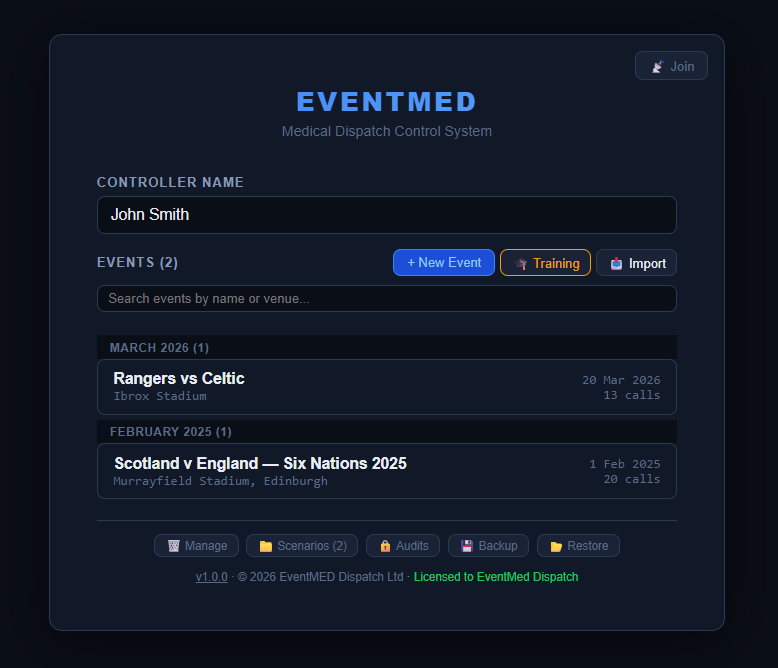
EventMED Dispatch — home screen showing active events
🚑 Private Medical Providers 🎪 Festival & Outdoor Events ⚽ Sporting Event Medical Teams 🎖 Voluntary Aid Societies 🏎 Motorsport Medical Cover
Features

Everything Your Control Room Needs

Designed from the ground up for event medical dispatch — not adapted from something else.

📡

Offline-First Operation

EventMED works entirely without internet. Your data never leaves the device. No cloud dependency means no single point of failure at an event.

🔒

Encrypted Local Database

All event data, patient records, and dispatch logs are encrypted at rest using AES-256. Only your device can read your data.

🚨

ETHANE & METHANE Major Incident

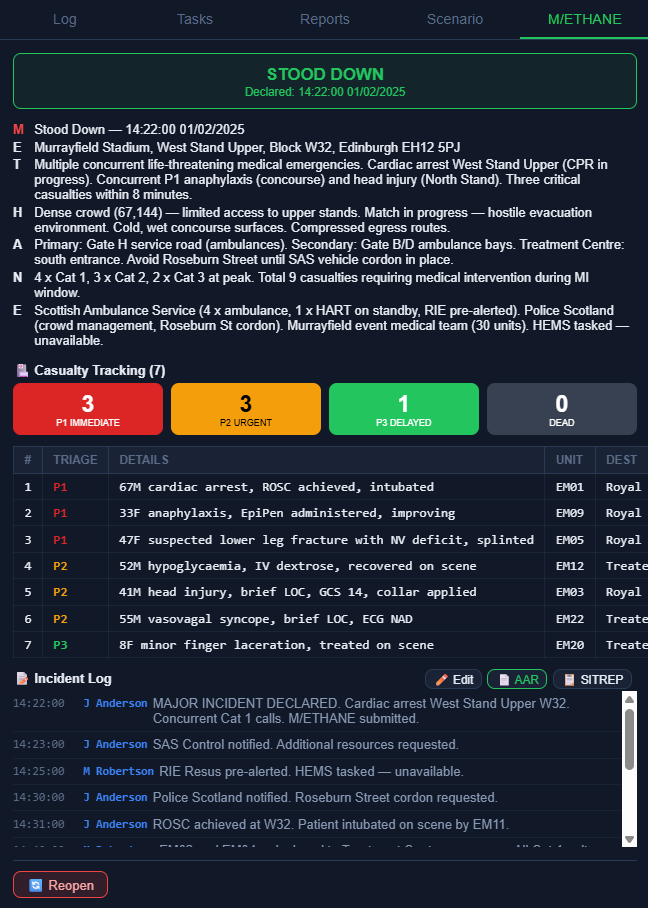
Declare an ETHANE standby or full METHANE major incident directly from the control room. Track casualties by triage category, log incident entries, and escalate from standby to full declaration with one click.

📋

Full After-Action Reporting

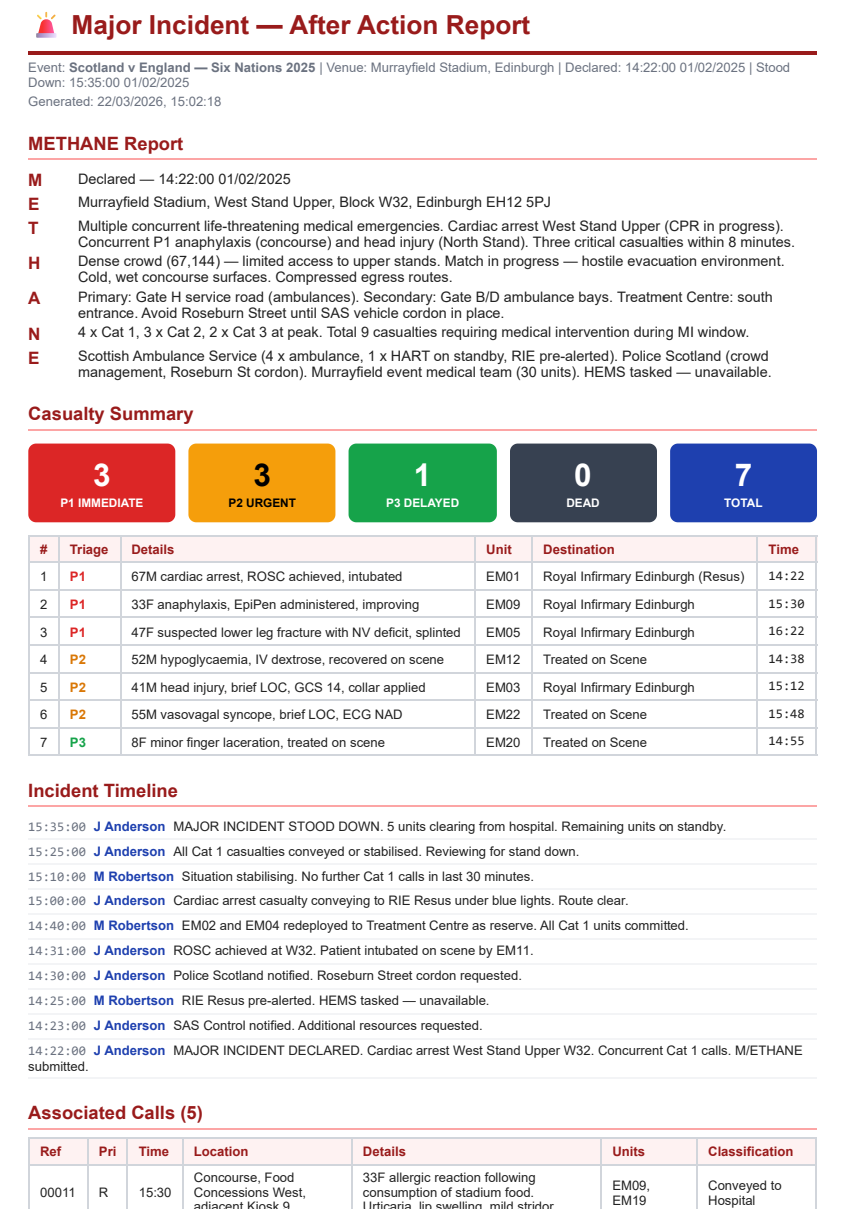
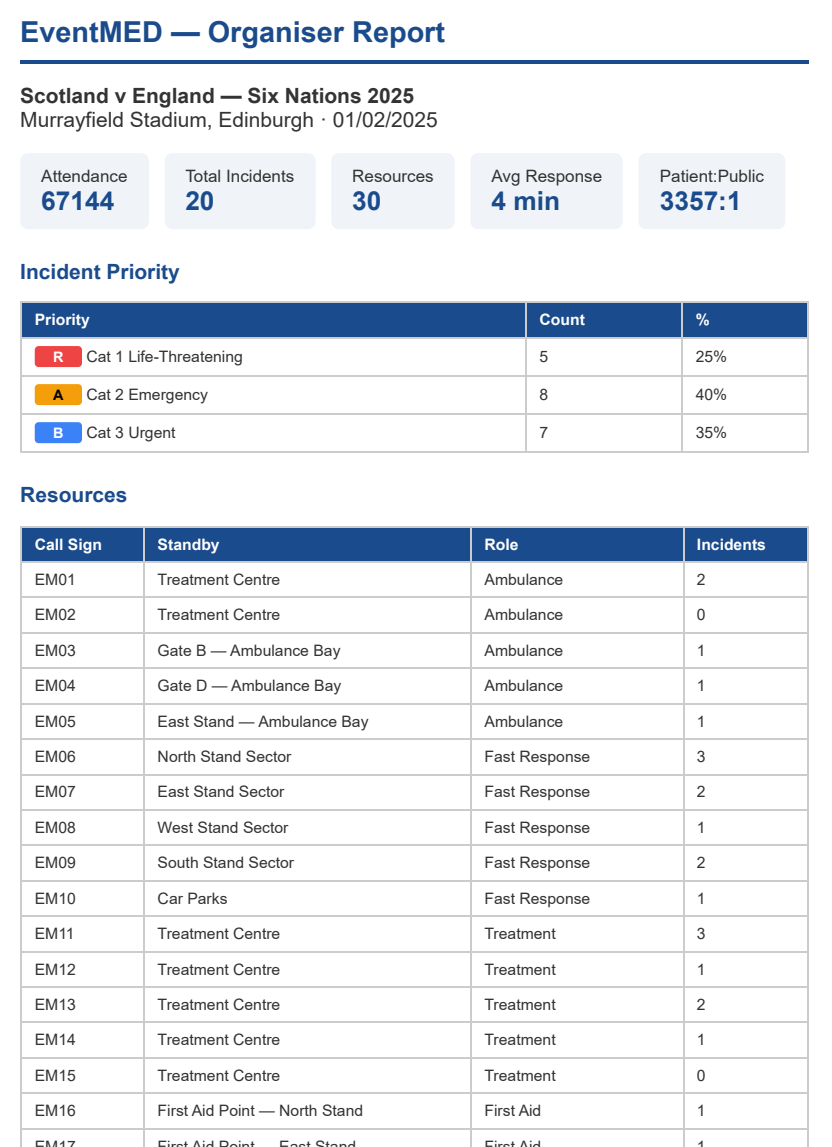
Generate an event summary, organiser report, and patient reporting breakdown at stand-down — category, age range, PRF reference, and outcome per call. Export to PDF, HTML, or CSV.

🚑

Unit Dispatch & Tracking

Drag a unit onto any call to dispatch instantly, or assign via right-click. Track status from sign-on through responding, on scene, left scene, and arrived — full timestamps logged automatically.

⌨️

SpeedType Abbreviations

Type an abbreviation and press Space — it expands to whatever your team has agreed on. Build the set once on one machine, export the file, and import it to every other installation. Works in call detail, log entries, and most text fields.

🔍

Tamper-Evident Audit Trail

Every write action — call raised, unit assigned, priority changed, log edited — is recorded in a hash-linked chain. Run a full integrity check on demand; export the chain as HTML or JSONL. Browse audit logs across all events from the startup screen without opening an event.

Operational Task List

Set reminders with an exact due date and time — overnight and multi-day tasks are unambiguous. Completed tasks record the finishing controller. Task state syncs to all connected clients in real time.

🗺

Venue Map Integration

Load a venue floor plan or site map and pin unit locations and call sites directly on the map — giving controllers instant situational awareness without leaving the dispatch screen.

🎓

Training Mode

Run full dispatch simulations using built-in scenario templates without touching the live database. Perfect for team training exercises and familiarisation sessions.

📡

Multi-Controller Sync

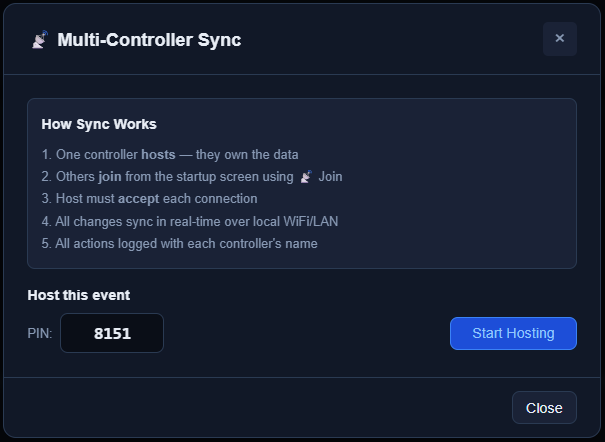
Run two or more dispatch controllers over the same local WiFi network, fully synchronised in real time. One controller dispatches, another monitors — perfect for large events.

Organisation & Enterprise
📈

Cross-Event Analytics

Compare performance across events with call volume charts, all-time priority breakdowns, and historical peak hour analysis. Gives medical leads the data they need for resource planning and clinical governance reporting. PDF export included.

💾

Auto-Backup & Selective Restore

Schedule automatic database backups at any interval to a folder of your choice — EventMED keeps the 10 most recent. Restore the full database or pick individual events from a backup file to recover deleted records without overwriting live data.

🔔

Active Safety Alerts

An audible alert fires on every new call. If an open call has no unit assigned after five minutes, a warning toast and audio escalation alert trigger automatically — so unresourced incidents never silently slip past a busy controller.

How It Works

Up and Running in Minutes

EventMED is designed to be operational before the gates open — not still being set up when the first call comes in.

Install & Activate

Download the installer, activate your licence key, and enter the event name and venue. Takes under five minutes on a fresh machine.

Load Your Scenario

Import a pre-built event scenario or set up units, standby locations, and call categories from scratch. Save scenarios for reuse at recurring events.

Dispatch & Log

Raise calls, assign units, update statuses, and maintain a running event log — all from a single screen designed for speed under pressure.

Export & Report

At stand-down, generate your AAR, organiser report, and audit log. Archive the event and export all documentation in one step.

Screenshots

See It in Action

A clean, purpose-built interface that works under pressure.

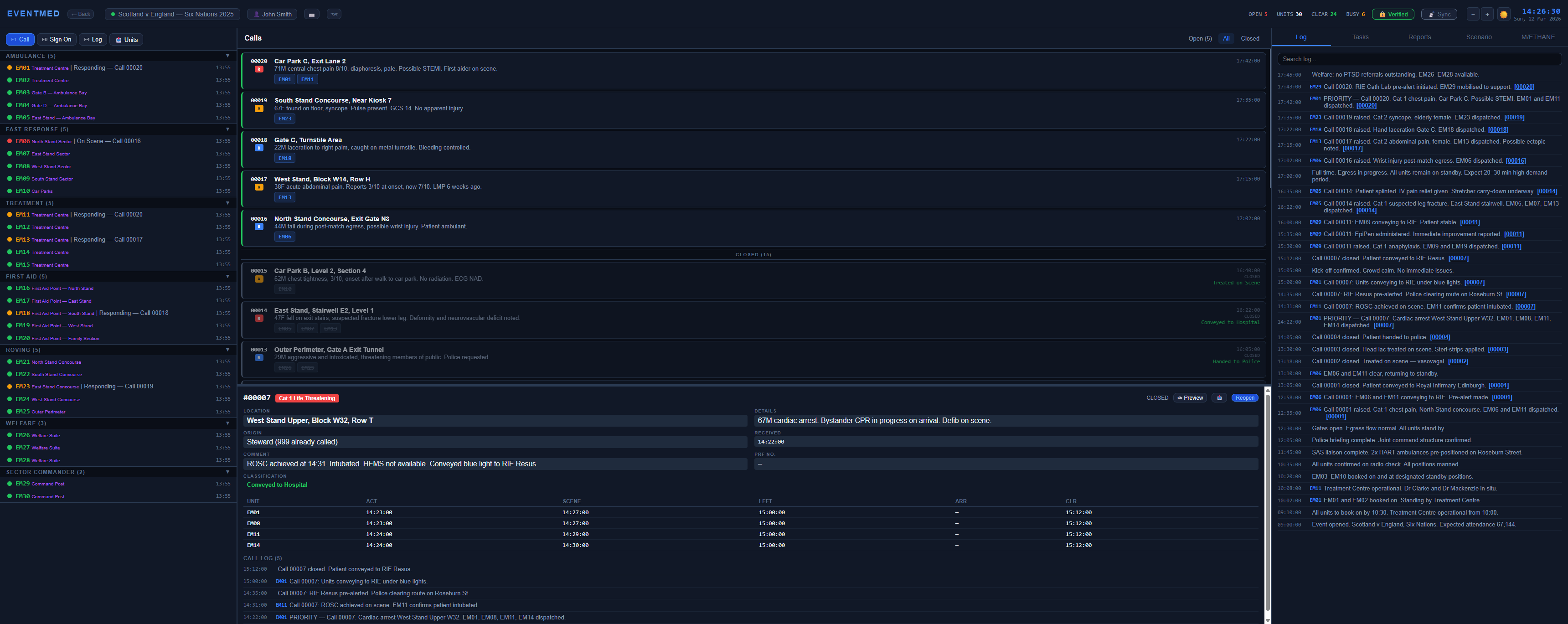
EventMED Dispatch — main dispatch control screen showing live calls, units and log Click to expand
EventMED Dispatch — METHANE major incident declaration screen Click to expand
EventMED Dispatch — after-action report showing event statistics and call breakdown Click to expand
EventMED Dispatch — venue map view with unit positions and call locations Click to expand
EventMED Dispatch — organiser summary report for event medical providers Click to expand
EventMED Dispatch — multi-controller sync across devices on a local network Click to expand
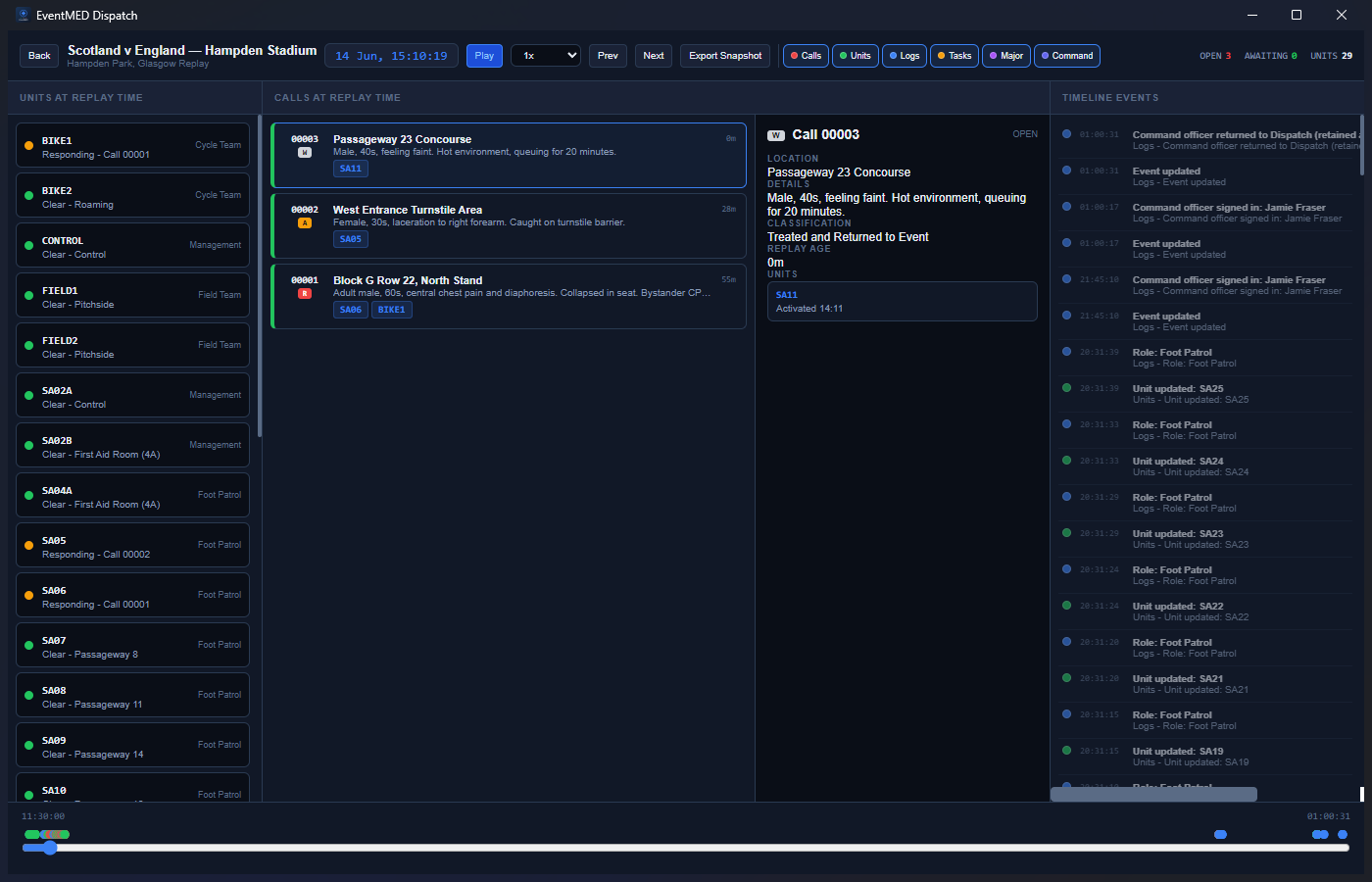
EventMED Dispatch — Dispatch Replay mode showing event timeline scrubber and historical call feed Click to expand
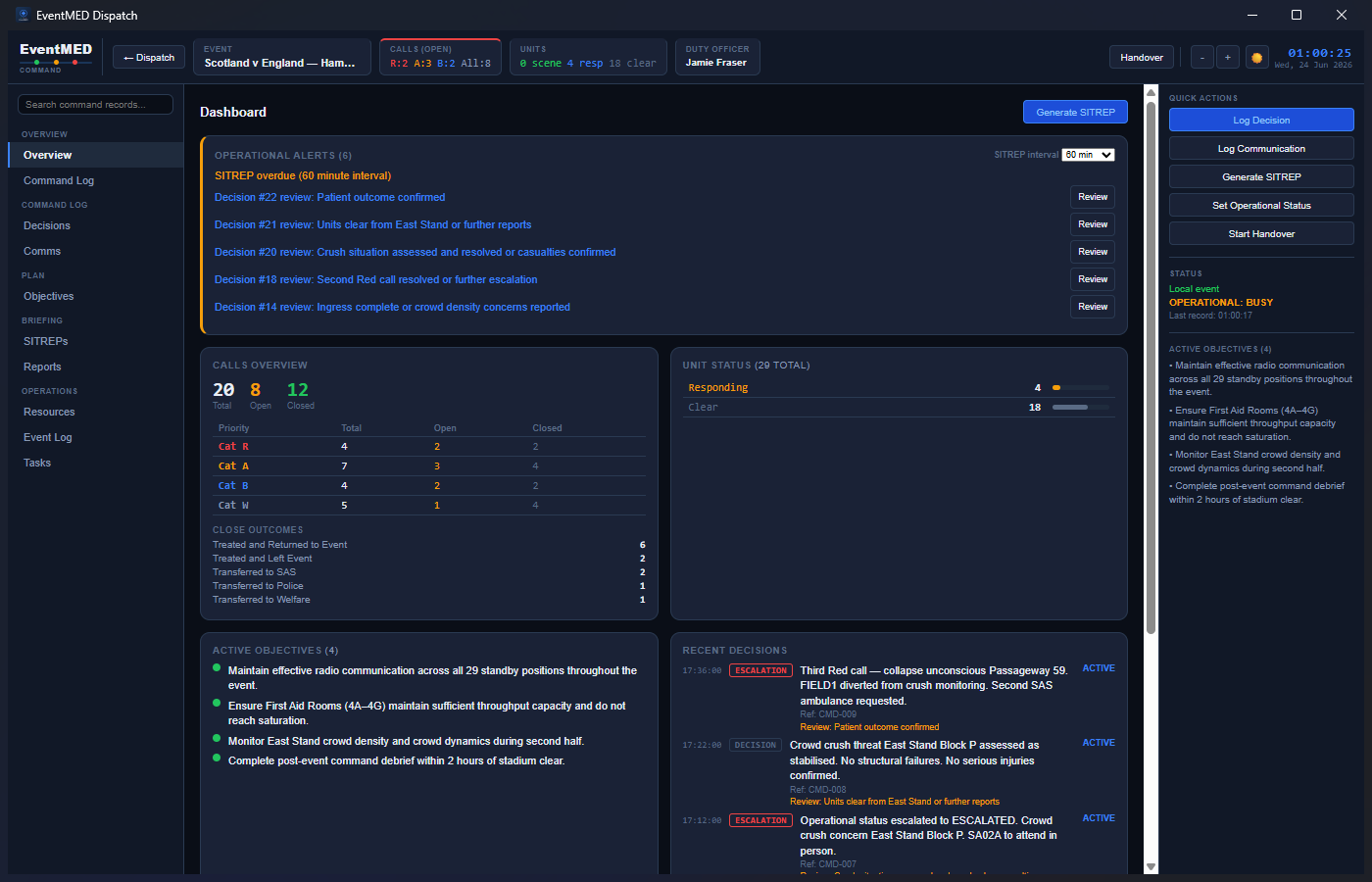
EventMED Dispatch — Command Module overview showing decisions, objectives, and operational alerts Click to expand

Screenshots are for illustrative purposes only. Venue names and event data shown are fictional and do not imply use of the software at those locations or endorsement by any organisation.

Command Module

Governance and Oversight for Command Officers

A duty-officer workspace that connects to the Dispatch host over the LAN — typically running on a separate terminal in a command vehicle or room alongside the dispatch operation. Included in the free trial. Organisation & Enterprise

⚖️

Decisions

Log every command decision with type, rationale, review schedule, and lifecycle status. Overdue reviews surface as operational alerts. Supersede a decision to preserve the earlier record while linking its replacement.

🎯

Objectives

Maintain ordered operational objectives with Active, Achieved, or Cancelled state. Completion is attributed to the officer who resolved it — keeping the governance record clean throughout the event.

📞

Communications Log

Record contacts, briefings, and agency notifications with method, content, officer, and timestamp. Held separately from the Dispatch event log and accessible through Command only.

📄

SITREPs

Generate versioned Draft and Final situation reports. Each SITREP captures a frozen snapshot of event state at the moment of generation — later changes to the event don't rewrite it.

📑

End of Event Command Report

A formal governance record with an immutable version history and SHA-256 content digest. Finalising creates an audited snapshot; subsequent changes produce a new version rather than overwriting history.

🔄

Handover

Formal officer transition: record the incoming officer, review outstanding objectives and actions, confirm acceptance. Sign-in, sign-out, and handover appear in the shared Dispatch event log.

Pricing

Simple, Transparent Licensing

Annual licence — updates, support, and all new features included. All tiers include a 30-day free trial.

Professional

Professional

Single control room. Everything you need for a well-run event medical operation.

£ 799

per year

updates, support & new features included

💺Up to 3 seats within one organisation

  • Full dispatch & call management
  • METHANE & major incident
  • AAR & organiser reports
  • Encrypted local database
  • Tamper-evident audit trail
  • SpeedType abbreviations
  • Venue map integration
  • Training mode & scenarios
  • Multi-controller sync
  • Priority support
Get Professional
Enterprise

Enterprise

Large-scale operations, multiple events, and organisations requiring dedicated support.

Contact Us


Tailored pricing for your organisation

💺Up to 25 seats within one organisation

  • Everything in Organisation
  • Up to 25 seats
  • Priority support response
  • Dedicated onboarding
  • Volume licence options
Contact Sales

All licences include a 30-day free trial — all features included, exported reports carry a trial watermark until activated. When the trial expires, the app enters read-only mode until a licence is activated. Licences are issued annually and include updates, support, and new features. After a paid licence expires there is a 14-day grace period of read-only access before renewal is required.
Seat limits are governed by the licence agreement on an honour system. All prices exclude VAT.

FAQ

Common Questions

Does EventMED require an internet connection?

No. EventMED is entirely offline-first. It installs on your device and stores all data locally. No internet connection is required during operation. An internet connection is only needed to download the installer.

Where is my data stored? Is it sent anywhere?

All event data — call records, dispatch logs, patient information, audit trails — is stored exclusively on your local device in an encrypted database. EventMED does not transmit any operational data to any server, ever. Your data is yours.

What happens when my licence expires?

When your licence expires, EventMED enters a 14-day grace period. During this time you retain read-only access — you can view all existing event data and export reports and audit logs, but cannot create new events, raise calls, or modify data. After the grace period a licence renewal is required to restore full access.

What operating systems are supported?

EventMED Dispatch runs on Windows 10 / 11, macOS 12 (Monterey) and later, and Linux (AppImage). It is a desktop application and does not currently run on tablets, mobile devices, or in a web browser.

How does multi-controller sync work?

Available on Organisation and Enterprise tiers. One device acts as host and other devices join over the same local WiFi or LAN network using a PIN code. All dispatch actions are synchronised in real time between connected controllers. No internet or cloud service is required — it works entirely on your local network.

Are there any limitations during the free trial?

All features are fully available during the 30-day trial with no restrictions on usage. The only difference is that exported reports and PDFs carry a trial watermark. Once a licence key is entered the watermark is removed and exports are clean.

Can I run EventMED on more devices than my seat allowance?

Seat limits are governed by the licence agreement on an honour system. By accepting the licence, you agree to only install EventMED on the permitted number of devices. If your needs grow beyond your current tier, please contact us to discuss an upgrade.

Is EventMED a medical device?

No. EventMED Dispatch is a dispatch coordination and resource management tool. It is not a medical device as defined by the UK Medical Devices Regulations. It does not provide clinical decision support, triage guidance, or treatment recommendations. All clinical decisions remain the responsibility of qualified medical personnel on the ground.

What support is included?

All active licences include software updates, new features, and email support as part of the annual fee. Enterprise licence holders receive priority support response. Support is provided by email at sales@eventmeddispatch.co.uk.

What is the Command Module?

The Command Module is a duty-officer workspace that connects to your Dispatch host over the LAN — typically running on a separate machine in a command vehicle or room. It records decisions with review schedules, manages operational objectives, logs communications, generates versioned SITREPs with frozen event-state snapshots, and produces a formal End of Event Command Report with an immutable, audited version history. Available on Organisation and Enterprise licences, and included in the free trial.

Does the free trial include the Command Module and multi-controller sync?

Yes — the 30-day trial gives full access to all features, including the Command Module and multi-controller sync. Trial exports include a watermark. Once a licence key is entered the watermark is removed and exports are clean.

What is Dispatch Replay?

Dispatch Replay reconstructs any saved event at a point in time. Scrub through calls, units, log entries, and major incident markers chronologically, step between timeline events, and export a snapshot at any moment. It is read-only — changing the replay time does not affect the original record. Useful for debriefs, controller training, and post-incident review.
Ready to run a tighter operation?

Start your free 30-day trial today. No credit card, no commitment — just a better dispatch system.

Start Free Trial Request a Demo
Free 30-Day Trial

Download EventMED Dispatch

No credit card required. All features included.

Your recommended download is highlighted. By downloading you agree to the Licence Agreement.